Low-VRAM AI Video Pack · ComfyUI
LTX-2.5 ComfyUI workflows for low-VRAM video
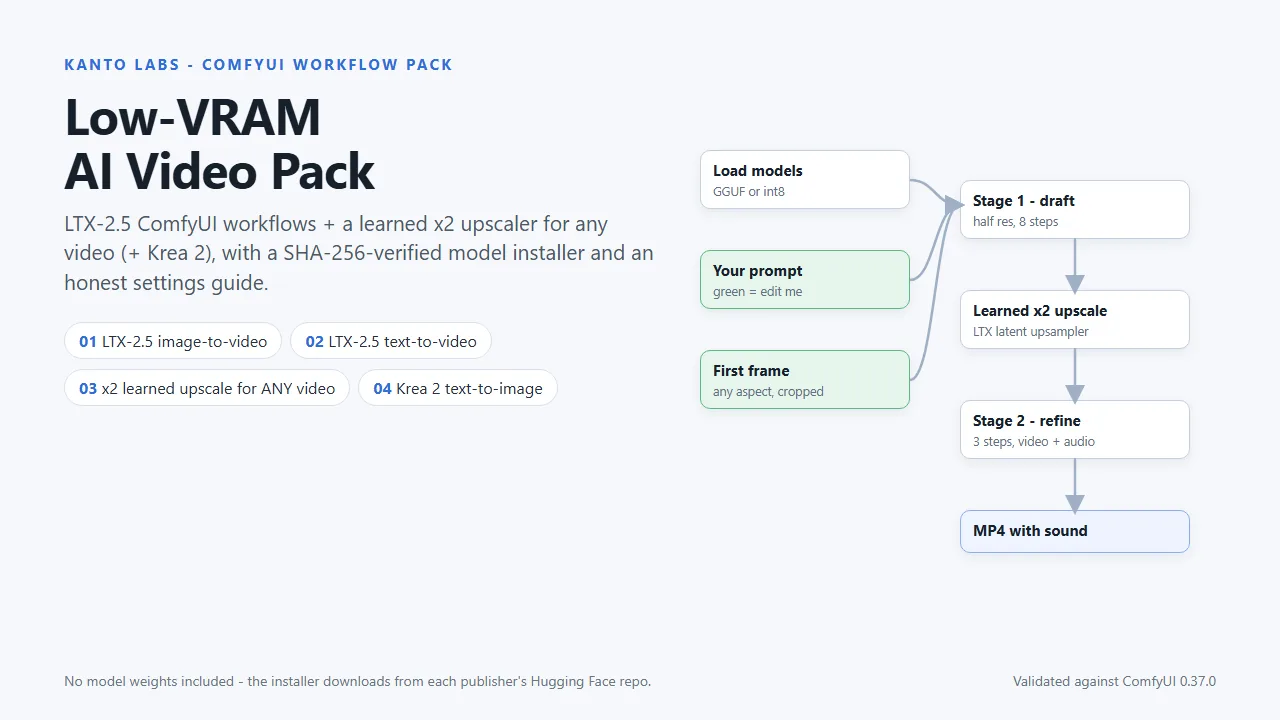
LTX-2.5 runs on gaming GPUs, if the workflow is set up right. Four from-scratch ComfyUI workflows, including a learned x2 upscaler for any video, a SHA-256-verified model installer and a settings guide that labels every number as measured or untested.
What's inside
Four LTX-2.5 and Krea 2 workflows for ComfyUI
LTX-2.5 image-to-video
First frame + prompt → video with sound. Half-resolution draft, LTX's learned x2 latent upscaler, 3-step refine. GGUF loader for smaller cards.
LTX-2.5 text-to-video
The same two-stage recipe, starting from a prompt.
x2 learned upscale for any video
Hand any clip to LTX's trained upscaler through LTX's own VAE: other models, older renders, camera footage. Original audio copied back bit-exact.
Krea 2 Turbo text-to-image
8-step first frames at your video's aspect ratio. Structure-validated; not render-tested yet, and labelled that way in the file.
Also in the zip: install_models.py, Settings_Guide.pdf (7 pages), tools/mux_original_audio.py, THIRD_PARTY.md and LICENSE.txt.
ComfyUI video upscaler
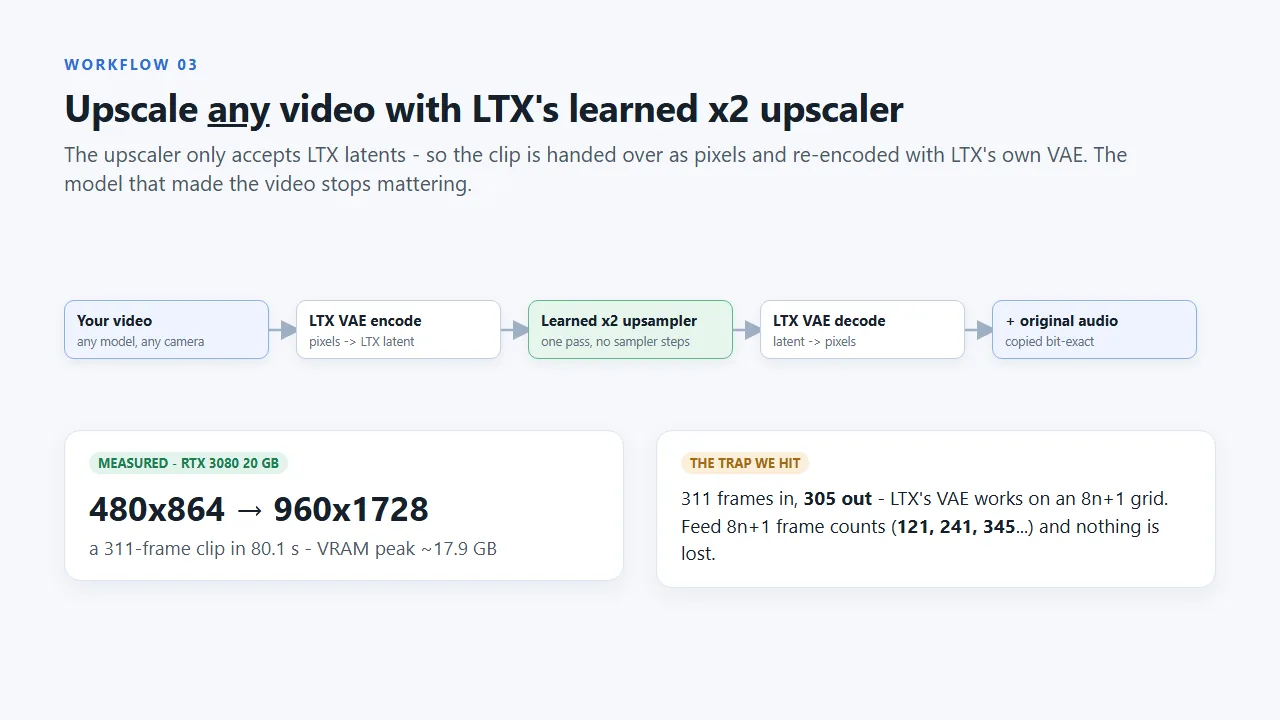
Upscale any video with LTX's learned x2 upscaler
LTX's upscaler only accepts LTX latents, so workflow 03 hands the clip over as pixels and re-encodes it with LTX's own VAE. After that, the model that made the video no longer matters: output from other models, older renders and camera footage all go through the same trained upscaler.
- Measured on an RTX 3080 20 GB: a 311-frame 480x864 clip → 960x1728 in 80.1 s
- The original audio is copied back bit-exact
- Feed 8n+1 frame counts (121, 241, 345…) and no frames are lost
Built to be used
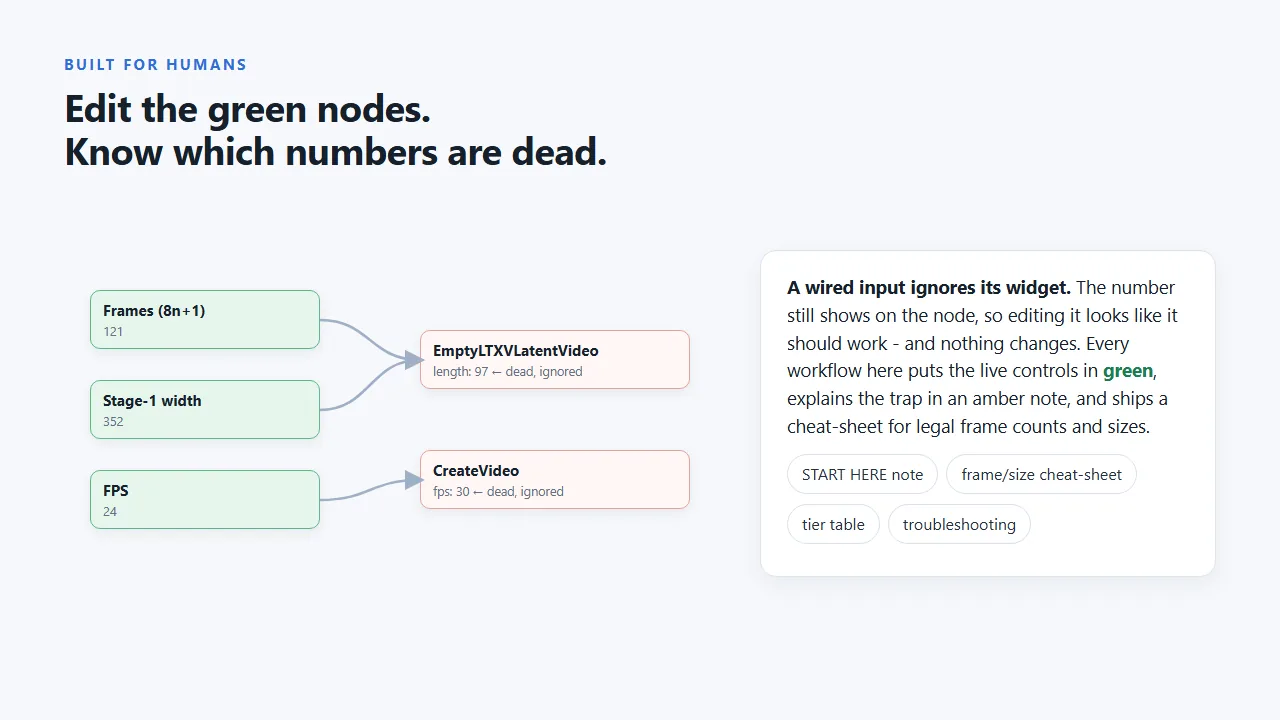
Edit the green nodes. Know which numbers are dead.
- Every workflow opens with a START HERE note, and only the green nodes are meant to be edited
- The “dead widget” trap is explained where it bites: a wired input ignores the number printed on it, so every live control sits in one place
- Frame-count and size cheat-sheets inside the graphs: LTX needs 8n+1 frames, and the final size is exactly 2x the draft size
Low VRAM, honestly
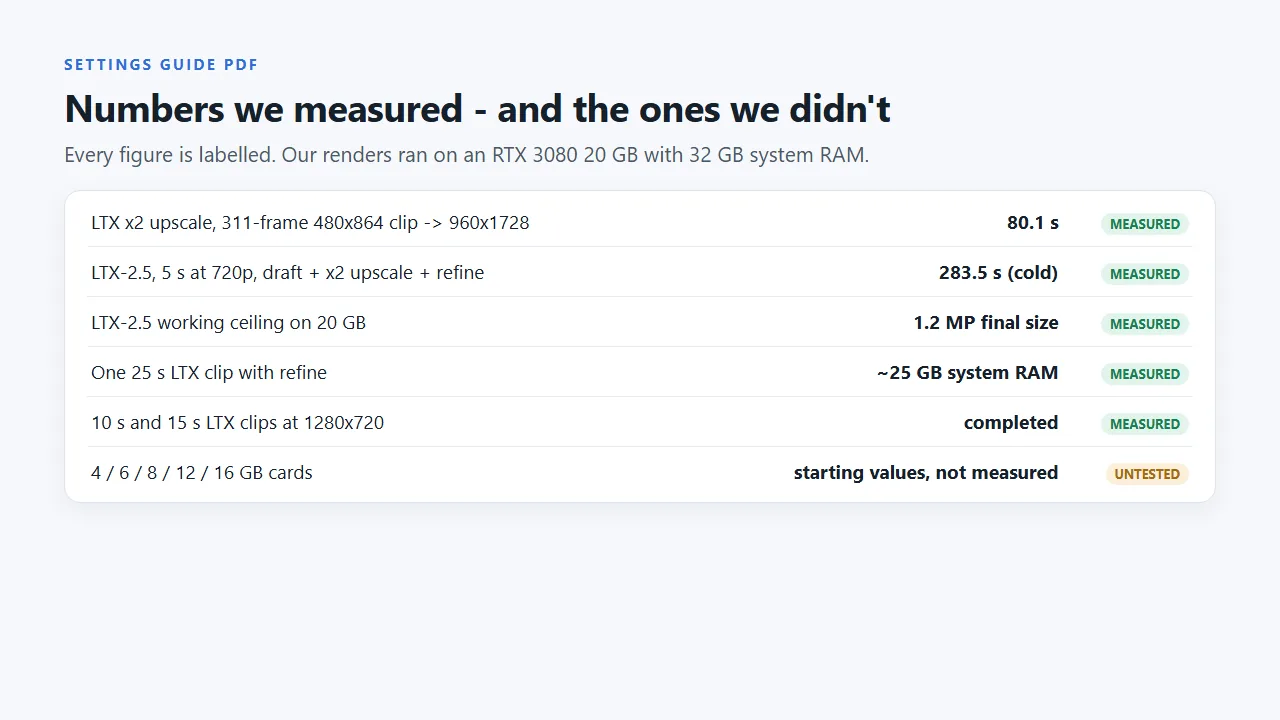
Numbers we measured, and the ones we did not
Measured on an RTX 3080 20 GB with 32 GB of system RAM:
| Job | Result |
|---|---|
| LTX x2 upscale, 311-frame 480x864 clip → 960x1728 | 80.1 s |
| LTX-2.5, 5 s at 720p, draft + x2 upscale + refine | 283.5 s (cold) |
| 10 s and 15 s clips at 1280x720 | completed |
| Working ceiling on 20 GB | 1.2 MP final size |
| One 25 s clip with refine | ~25 GB system RAM |
Not measured: 4, 6, 8, 12 and 16 GB cards. The Settings Guide gives careful starting values for them, marked UNTESTED. Workflow 04 (Krea 2) is structure-validated but not render-tested yet.
Requirements
What you need
- ComfyUI 0.37.0 or newer (validated against 0.37.0)
- Free custom node packs: ComfyUI-GGUF and ComfyUI-VideoHelperSuite (links in the pack)
- An NVIDIA GPU; 32 GB of system RAM recommended
- Disk space: about 31 GB for LTX, about 19 GB for Krea 2
- A free Hugging Face account (LTX-2.5 is gated behind its licence)
Licences
Read before you publish
- The workflows: personal and commercial use, one person, no redistribution
- LTX-2.5: free for commercial use under $10M annual revenue; published outputs must be disclosed as AI-generated
- Krea 2: commercial use only while your company earns under $1M a year
Not affiliated with Lightricks, Krea or Comfy-Org.
FAQ
Questions
Does it run on 8 GB or 12 GB of VRAM?
We have not measured it on 4, 6, 8, 12 or 16 GB cards. The workflows include a GGUF loader for smaller cards, and the Settings Guide gives careful starting values for each tier, clearly marked UNTESTED. Our measured numbers come from an RTX 3080 20 GB with 32 GB of system RAM.
Why does system RAM matter so much?
Long LTX-2.5 clips can run out of system RAM before they run out of VRAM: one 25-second clip with refine used about 25 GB of system RAM in our tests. The guide covers RAM planning; 32 GB is recommended.
Are the models included?
No, the pack contains no model weights. install_models.py downloads each model from its publisher's Hugging Face repository into the right ComfyUI folder and checks its exact size and SHA-256. It resumes interrupted downloads. LTX-2.5 needs a free Hugging Face account because it is gated behind its licence.
Can the upscaler really take any video?
Yes, as long as ComfyUI can load it. Workflow 03 re-encodes the clip with LTX's own VAE, runs LTX's learned x2 upscaler and decodes it, so it works on output from other models, older renders and camera footage. The original audio is copied back bit-exact. LTX works on an 8n+1 frame grid, so feed 121, 241 or 345 frames to lose none.
Can I use the videos commercially?
The workflows are licensed for personal and commercial use by one person. The models have their own licences: LTX-2.5 is free for commercial use under $10M annual revenue and published outputs must be disclosed as AI-generated; Krea 2 allows commercial use only while your company earns under $1M a year. Summaries with links are in THIRD_PARTY.md.
Which ComfyUI version and custom nodes do I need?
ComfyUI 0.37.0 or newer (validated against 0.37.0), plus two free custom node packs: ComfyUI-GGUF and ComfyUI-VideoHelperSuite. An NVIDIA GPU is required.
Is it affiliated with Lightricks, Krea or Comfy-Org?
No. These are independent workflows built from scratch for the public models.
Low-VRAM AI Video Pack: $19
Four workflows, the model installer and the Settings Guide. Want Claude to write the prompts too? Claude Code Skills for AI Video is coming soon.